

Despite its name, LanceDB is not a “database” in the traditional sense — it is a Multimodal Lakehouse that builds on the table abstraction, similar to many other lakehouse projects. LanceDB exposes a catalog-level abstraction over the Lance table format, via a namespace spec. If you’re coming from traditional databases or lakehouses, you can think of a namespace as the catalog path that says where a table name lives. Lance provides the file and table formats to store and manage your data and indexes. LanceDB operates at the catalog layer (used to organize, discover, and operate on many Lance tables) and provides a compute engine on top of the Lance format. This is why many SDK methods in LanceDB, likeDocumentation Index
Fetch the complete documentation index at: https://lancedb-bcbb4faf-docs-namespace-typescript-examples.mintlify.app/llms.txt
Use this file to discover all available pages before exploring further.
create_table, open_table, drop_table, and
rename_table, accept namespace input. The SDK methods expose that input in the idiom of each
language: Python uses namespace_path, Rust uses builder methods like .namespace(...), and
TypeScript uses namespacePath arguments.
Namespace hierarchy
Namespaces are generalizations of catalog specs that give platform developers a clean way to present Lance tables in the structures users expect. The diagram below shows how the hierarchy can go beyond a single level. A namespace can contain a collection of tables, and it can also contain namespaces recursively.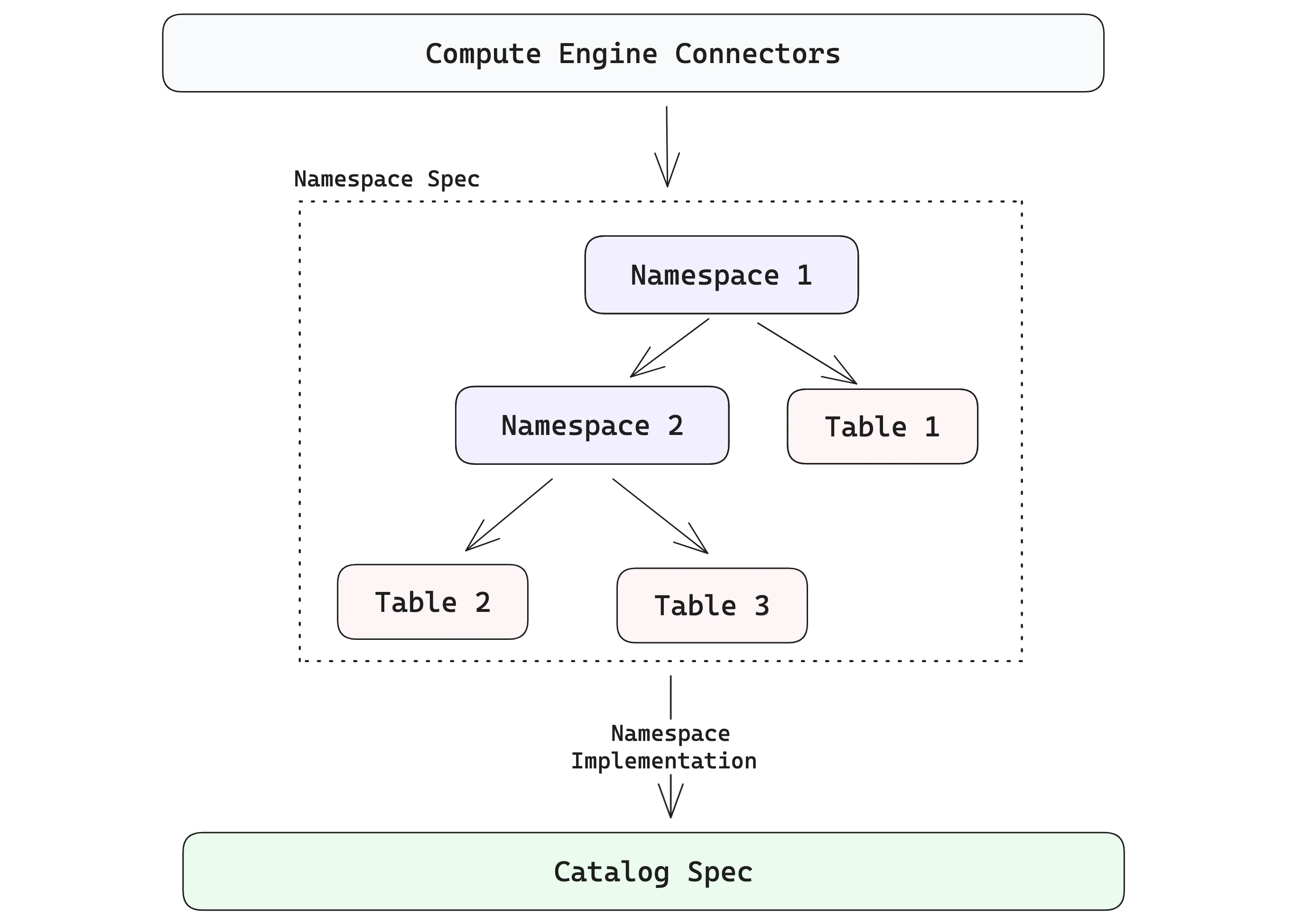
Namespace paths and names
A namespace path is a list of components. For example,["prod", "search"] means the search
namespace inside the prod namespace. The empty path, [], means the root namespace.
Each component is a name, not a filesystem path segment. Namespace names can’t be empty, and each
component can contain only letters, numbers, underscores, hyphens, and periods. That keeps the same
identifier usable across local directory namespaces and REST namespace identifiers.
Directory namespaces
The simplest namespace model in LanceDB is a single root namespace, often represented by one directory:data/ directory, where the root namespace is implicit. Connecting to this namespace is as simple as connecting to the catalog root:
data/) under the specified root path.
You can also explicitly connect to a namespace using lancedb.connect_namespace(...) with the directory namespace implementation:
- For simple use cases in LanceDB OSS, you don’t need to go too deep into namespaces.
- To integrate LanceDB with external catalogs and to use it as a true multimodal lakehouse, it’s useful to understand the different namespace implementations and how to use them in your organization’s setup.
Remote or external catalog namespaces
The example above showed local directory-based namespaces. LanceDB also supports namespaces backed by remote object stores and external catalogs, via the REST namespace implementation. For remote object stores with central metadata/catalog services (either commercial or open source), use the REST namespace implementation. It is backed by REST routes (for examplePOST /v1/namespace/{id}/create and GET /v1/namespace/{id}/list) and server-provided table locations.
For authentication, any property prefixed with headers is forwarded as an HTTP header
(for example headers.Authorization becomes Authorization, and headers.X-API-Key becomes X-API-Key).
LanceDB Enterprise REST requests use the x-api-key header for API-key authentication. Deployments
that route multiple databases through the same endpoint can also use headers such as
x-lancedb-database or x-lancedb-database-prefix for database context.
Best practices
Below, we list some best practices for working with namespaces:- For simple use cases and single, stand-alone applications, the directory-based root namespace is sufficient and requires no special configuration.
- For remote storage locations, introduce explicit namespaces when multiple teams, environments, or domains share the same catalog.
- Treat namespace paths as stable identifiers (for example
"prod/search","staging/recs"). - For maintainability reasons, avoid hard-coding object-store table paths in application code — instead, prefer catalog identifiers + namespaces.