



Despite its name, LanceDB is not a “database” in the traditional sense. It is a Multimodal Lakehouse built on Lance tables plus a catalog abstraction. As you dive deeper into LanceDB, it helps to separate two ideas:Documentation Index
Fetch the complete documentation index at: https://lancedb-bcbb4faf-docs-namespace-typescript-examples.mintlify.app/llms.txt
Use this file to discover all available pages before exploring further.
- A table is where your data lives and is queried.
- A namespace is how groups of tables are organized and resolved at the catalog level.
Understanding tables
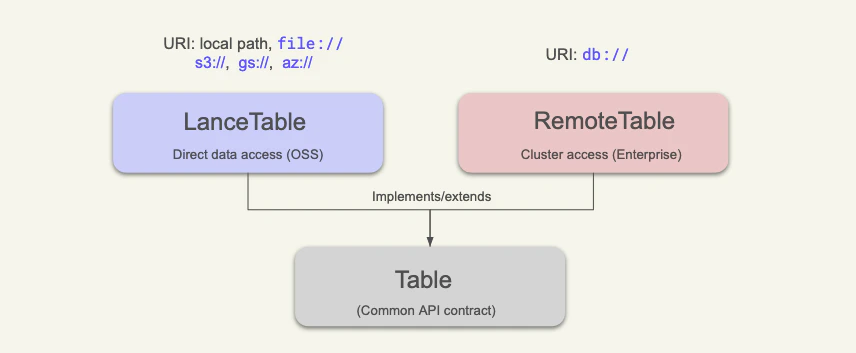
A table is the core data abstraction in LanceDB: a structured dataset with schema, indexes, and versioned updates. What changes between deployments is how that table is addressed and accessed. The mental model below clarifies table types by connection mode:LanceTable: direct table access (local path,file://,s3://, and similar object-store paths). This is the common mode in LanceDB OSS.RemoteTable: catalog-backed table access through a server/cluster (db://...). This is the mode you will use in LanceDB Enterprise.
Semantic difference between tables and namespaces
The easiest way to think about this is:- A table answers: “What data do I store and query?”
- A namespace answers: “Where does this table name live in my catalog hierarchy?”
| Concept | Scope | Owns | Typical operations |
|---|---|---|---|
| Table | Data layer | Schema, rows, indexes, versions | create_table, open_table, inserts/updates/deletes, search/query |
| Namespace | Catalog layer | Hierarchy of names, table grouping, table name resolution | create_namespace, list_namespaces, drop_namespace, table ops with namespace |